

Introduction
Organizations that redesign work are twice as likely to exceed their AI ROI expectations (Deloitte, 2026), yet most SaaS teams never audit their redesign strategy against this standard. Human machine collaboration UX is the deliberate design of who decides, when the system acts, and how control transfers inside a shared workflow. The failure point is that teams add an AI layer on top of an unchanged workflow and call it a redesign, then wonder why activation numbers barely move. This article breaks down the work design lens that separates AI features users adopt from ones they try once and abandon.
A redesign only pays off when it changes who does the work and how, not just what the interface looks like. If your AI feature added a new screen but the task sequence stayed identical, you built a skin, not a collaboration.
Key Takeaways
- Audit your last three AI feature launches against a decision-ownership checklist before approving another redesign budget.
- Map every AI-assisted task by who decides, human, machine, or shared, instead of by interface screen.
- Build a visible audit trail into any AI decision point where users need to understand how an outcome was reached.
- Treat customer skepticism toward AI-run service as a design constraint to solve, not a marketing message to soften.
- Run a UX audit for AI readiness to see where design spend on AI features will actually pay off.

Key Takeaways
- Audit your last three AI feature launches against a decision-ownership checklist before approving another redesign budget.
- Map every AI-assisted task by who decides, human, machine, or shared, instead of by interface screen.
- Build a visible audit trail into any AI decision point where users need to understand how an outcome was reached.
- Treat customer skepticism toward AI-run service as a design constraint to solve, not a marketing message to soften.
- Run a UX audit for AI readiness to see where design spend on AI features will actually pay off.
Human machine collaboration UX separates task automation from task redesign
Human machine collaboration UX is the difference between a tool that automates a step and a tool that redesigns who owns each part of a task. Most teams skip this distinction. They take an existing workflow, bolt on an AI suggestion box, and ship it as an AI redesign.
The result is an interface change without a work design change. Users notice immediately, because their actual job hasn’t gotten easier. This is human-centered AI product design at its most basic test: does the person’s real task change, or just the pixels around it.
Customer skepticism raises the cost of getting this wrong. A 2024 Gartner survey found that 64% of customers preferred that companies not use AI for customer service (Gartner, 2024). That finding should still reframe how product teams approach AI UX. Capability alone is not the goal. Teams need to design the handoff points where a person stays in control, or they’re fighting a trust deficit before the feature ships.
reloadux starts every AI redesign engagement with a role audit, not a UI audit, that examines who actually owns each decision in the workflow. The question isn’t whether the interface looks modern. It’s whether the workflow now makes sense given what the machine reliably does and what the human still verifies. Teams that skip this step end up with AI features stuck at zero adoption because the redesign never touched who does what.
AI UX work design ROI depends on redesigned roles
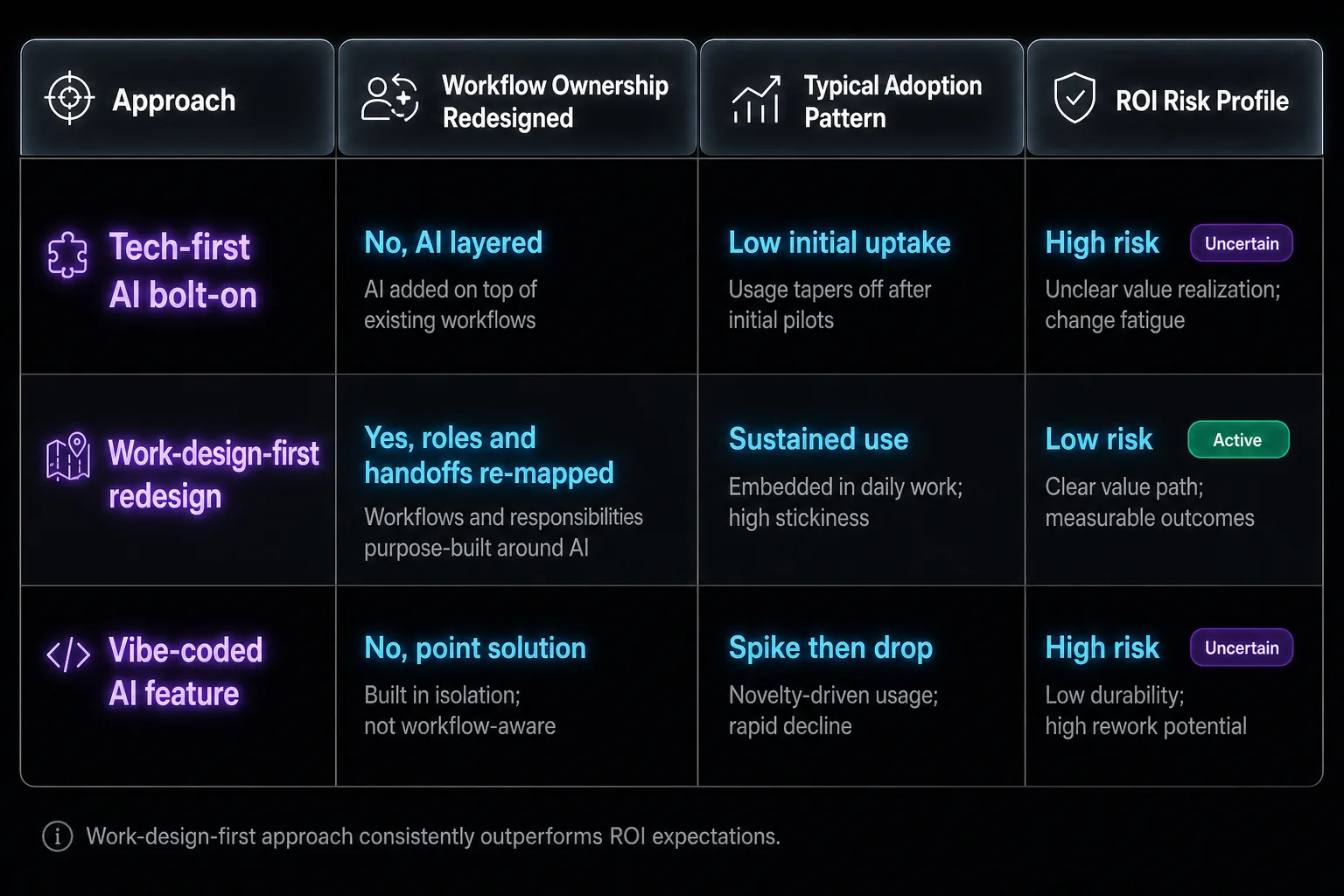
AI UX work design ROI hinges on whether a team redesigned the workflow or simply wrapped it in a new interface. Teams that treat AI as a bolt-on technology consistently underperform their own ROI projections. Teams that redesign roles around what the AI can and cannot reliably do consistently exceed them.
Most product leaders lack a way to prove this to their own leadership. That gap is a design problem showing up disguised as a measurement problem. If an AI feature never changed task ownership, there’s nothing structural to measure, only usage logs on a feature people tolerate rather than depend on.
A European telecommunications company illustrates the gap directly: adding an AI expert to customer service without changing roles or workflow lifted productivity by just 5% (Deloitte, 2026). When the same company dedicated 90% of its rollout budget to redesigning the human-AI interaction, building new workflows, trust thresholds, escalation paths, and training, productivity rose 30%. The technology didn’t change between those two outcomes. The work design did.
Here’s the comparison that matters when deciding how to approach the next AI redesign. In fact, 59% of organizations report a tech-focused approach to AI investment, and those organizations are 1.6 times more likely to report AI investments not exceeding expectations (Deloitte, 2025).
| Approach | Workflow Ownership Redesigned | Typical Adoption Pattern | ROI Risk Profile |
|---|---|---|---|
| Tech-first AI bolt-on | No, AI layered on existing screens | Feature tried once, then abandoned | High risk, most common approach |
| Work-design-first redesign | Yes, roles and handoffs re-mapped | Sustained use tied to task completion | Low risk, twice as likely to exceed ROI expectations (Deloitte, 2026) |
| Vibe-coded AI feature | No, generated without workflow context | Inconsistent, depends on prompt specificity | Unclear, product-market fit remains the deciding factor |
That third row matters more than it looks. A founder can generate a slick AI interface fast, but speed of generation says nothing about whether the workflow underneath makes sense. A purely vibe-coded app cannot be ruled out from sustained commercial success, because the most important thing there is product-market fit. Fast output without work design is still a gamble.
Decision mapping is the mechanism that separates adopted AI features from ignored ones
AI product design workflow integration means naming every point in a task where a decision gets made, then deciding explicitly whether it belongs to the human, the machine, or both. Skip this step and the interface feels arbitrary to the person using it, because nobody designed who’s actually in charge at each moment.
This is where the Agentic Workflow UX discipline proves its value. Agentic systems raise the stakes on this mapping because the AI isn’t suggesting anymore, it’s acting. Every action point needs a corresponding trust signal, or users disengage the moment the system does something unexpected.
reloadux relies on the audit trail pattern for this reason. The audit trail design pattern provides the needed transparency to show users how an outcome was achieved, which functions as a core mechanism for AI trust across production interfaces. Without it, users guess whether a recommendation is reliable, and guessing is where adoption dies quietly.
Without an audit trail, users guess whether the AI is reliable, and adoption dies quietly.
Workflow integration also demands specificity about constraints, not just capability. Vibe coding isn’t all about the vibes: users should provide as many specifics as possible to AI tools, such as design references, brand constraints, and what the user doesn’t want to see. The same discipline governs workflow design. Specify the constraint, or the system fills the gap with something nobody approved.
This is where reloadux applies its AI-Native Product Design Framework, layering role audit, audit trail mapping, and control point design into a single workflow assessment before any screen gets touched.
SaaS AI adoption design rises when control points are visible and easy to use
SaaS AI adoption design succeeds or fails based on whether users feel they retain meaningful control at the moments that matter most. A redesign that removes visible control points, even while adding real capability, tends to suppress adoption rather than accelerate it.
This connects directly to the customer skepticism data cited earlier. If most customers would rather a company not use AI for service interactions, the design response is to make control points obvious and easy to exercise. Confirmation steps, visible override options, and clear escalation paths are the mechanism that makes automation acceptable.
Teams building AI assistant interfaces run into this constantly. An assistant that acts without a visible confirmation moment might save two seconds of clicking, but it costs far more in trust when it gets something wrong. The design question is whether the user knows the AI is about to act, and can stop it easily.
Common Failure Modes in AI UX Work Design
Four failure patterns recur in AI redesigns that skip the work design layer.
- Retrofit without role redesign. A team adds an AI panel to an existing screen without changing task ownership. Prevention: run a role audit before interface design to find decision ownership gaps first.
- Missing audit trail at the decision point. The AI produces a recommendation with no visible reasoning. Prevention: build an audit trail into every AI decision point so users can verify the outcome themselves.
- No human override before irreversible action. The system acts autonomously on something the user wanted to review first. Prevention: map every irreversible action and design a confirmation step before launch.
- Vague constraints treated as sufficient specification. The team assumes the AI understands brand or workflow context without stating it. Prevention: document explicit constraints, references, and exclusions before any AI output ships to users.
Each traces back to the same root cause. The interface changed, but nobody redesigned the actual division of labor between the person and the system.
Founder speed versus design lead structure, and where they meet
Product founders building AI-native features in-house move fast on the technical layer. They often lack a structured process for mapping decision ownership across a workflow. A founder focused on shipping quickly might assume the model’s output quality is the whole story, when the real gap is that nobody defined who approves the AI’s recommendation before it reaches a customer.
Design leads brought in as partners bring that structured process but need fast access to real usage data to calibrate it correctly. A design lead without that access risks designing trust signals for problems users don’t actually have. The strongest outcomes come from pairing founder-level product intuition with a partner that has shipped enough AI-native products to recognize failure patterns early, before they show up in churn.
About reloadux
reloadux approaches every AI UX engagement by starting with a role audit before touching a single screen. This process, called AI Opportunity Mapping, identifies where decisions currently sit in a workflow and where they should sit once AI capability is introduced. It precedes any interface work, because a well-designed screen on top of a poorly designed workflow still fails to change user behavior.
This work design approach shows up in client results: Mass Media Co cut order errors from 25% to 2% after a workflow redesign, and Digno saw a 15% increase in sales alongside a 20% reduction in operational costs.
At reloadux, we design AI-native experiences for SaaS teams and startups building the next generation of AI-powered products. With over 500 projects delivered and a 95% client retention rate, reloadux has repeatedly seen that the redesigns clients remember aren’t the flashiest ones. They’re the ones where a single workflow got redesigned around clear decision ownership, and users noticed the difference in their day.
Conclusion
The AI UX redesigns that actually move adoption numbers are the ones where a team asked who owns each decision before asking what the screen should look like. Interface polish alone produces a feature people try once and quietly abandon. Teams pulling ahead right now treat human machine collaboration UX as a structural design question that determines whether users adopt a feature or ignore it.
If your last AI feature launch didn’t move activation or retention the way you expected, the likely culprit is an unaudited workflow. Put it to the test with the reloadux 2-day trial: a focused UX review of one core flow, plus one or two redesigned screens, so your team sees the direction before committing to a full redesign.
FAQs

Talha Saleem
Senior UI/UX Designer